Run a Product Line as a Project: Collection Briefs and Checkable Requirements
A recipe collection can carry a brief — description, custom instructions and requirements — that every AI surface reads and the app verifies against each member recipe. Here is how the brief, the conformance summary, Collection Studio and whole-collection changes fit together.
A Collection Is a Project
A winter bonbon line is not really a folder of recipes. It is a short list of decisions that apply to all of them at once: this couverture and no other, every filling pipeable at 28 °C, three weeks on the shelf, nothing with alcohol. Those decisions normally live in one person’s head, never make it onto the recipe cards, and are the first thing a stand-in gets wrong in December.
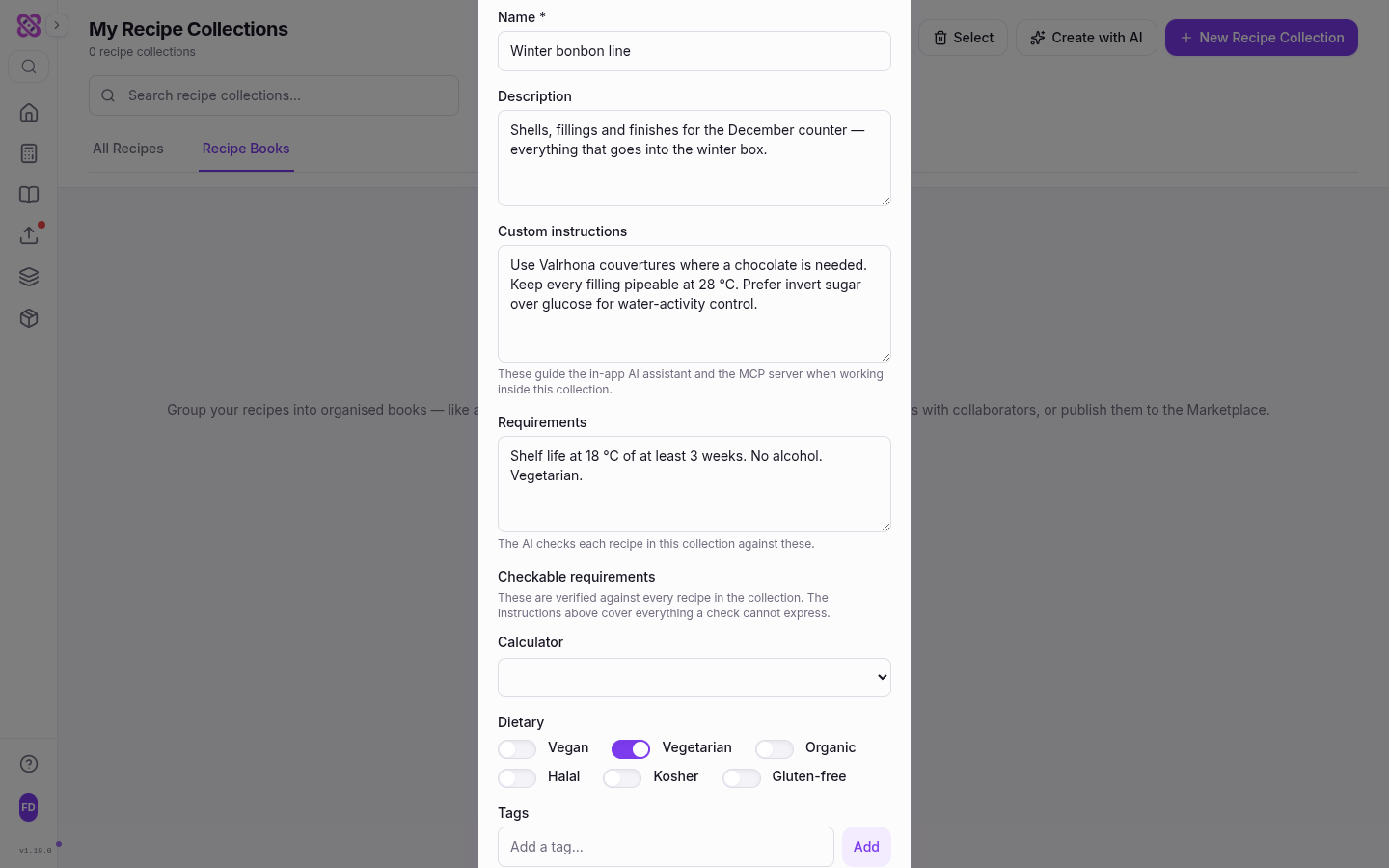
A recipe collection in Formul.io is built to hold them. Open New Recipe Collection, or Edit on a collection you already have, and the form asks for more than a name: Description, Custom instructions and Requirements, followed by a structured block called Checkable requirements. Together those fields are the collection’s brief — the same idea as a project in Claude or ChatGPT, with one difference that matters: half of the brief is not only read, it is verified.
The brief is private. Custom instructions and requirements never appear on a shared collection page, and a collection cloned from the Marketplace arrives without them. Readers get the recipes; the brief describes how you work.
What each part needs
Recipe collections, the brief, the checkable requirements and the conformance summary are available on every plan. The AI surfaces need Pro: the Formul.io Assistant on the dashboard and the Recipe Collection Studio. Build a book and costing and margins are Pro features too.
The Brief: Prose the AI Reads, Values the App Checks
The three free-text fields do different jobs, and the form states each one underneath the box.
| Field | What belongs in it | Who reads it |
|---|---|---|
| Description | What this line is, in one or two sentences — “Shells, fillings and finishes for the December counter.” | Shown on the collection page and to anyone you share it with |
| Custom instructions | How recipes here should be built: preferred couvertures, a piping temperature, a sweetener you avoid. The field's own note reads “These guide the in-app AI assistant and the MCP server when working inside this collection.” | Every AI surface working inside the collection, in the app and through a connected assistant |
| Requirements | What each recipe must meet, in your words — “Shelf life at 18 °C of at least 3 weeks. No alcohol. Vegetarian.” | The same AI surfaces; the form notes “The AI checks each recipe in this collection against these.” |
The three prose fields of a collection brief and who reads each.
Prose is the right shape for anything that needs judgement. Prefer invert sugar over glucose for water-activity control is a real instruction and no check could express it. What prose cannot do is answer the question every line eventually raises — which of these eighteen recipes actually misses the target? For that, the same brief has a second half.
Requirements the App Can Verify
Under the prose sits Checkable requirements, with its own note: These are verified against every recipe in the collection. The instructions above cover everything a check cannot express. Four controls, every one of them optional — a control you leave alone constrains nothing.
- Calculator pins what the line is built as. The default is Any calculator.
- Style appears once a calculator is chosen, and only for calculators that have a style setting. The default is Any style.
- Dietary is a row of switches: Vegan, Vegetarian, Organic, Halal, Kosher, Gluten-free.
- Metric targets appear once a calculator is chosen, drawn from the metrics that calculator actually computes. Each target takes a Min, a Max, or just one of the two: Leave a bound empty for an open-ended target, such as a shelf life with no ceiling.
Nothing here is typed freehand. The styles and metric keys on offer come from the calculator itself, so a requirement cannot name a target no recipe could be judged against — and the collection may be stricter than the style it builds on, which is usually the point of writing one down.
The Conformance Summary Is a Worklist
Once a collection has checkable requirements, its page gains a Requirements card. When everything lines up it says so in one line — All 8 recipes meet this collection’s requirements. When it does not, it names the misses: 3 of 3 recipes do not meet this collection’s requirements, followed by each recipe and each finding underneath it. A finding always carries both sides of the comparison, because a recipe that “misses the target” without the numbers is not something anyone can act on. A dietary miss names the ingredient that caused it — Not vegetarian — Caster Sugar. A style or calculator miss states what the recipe was built as and what the collection asked for. A metric miss gives the computed value and the window it fell outside.
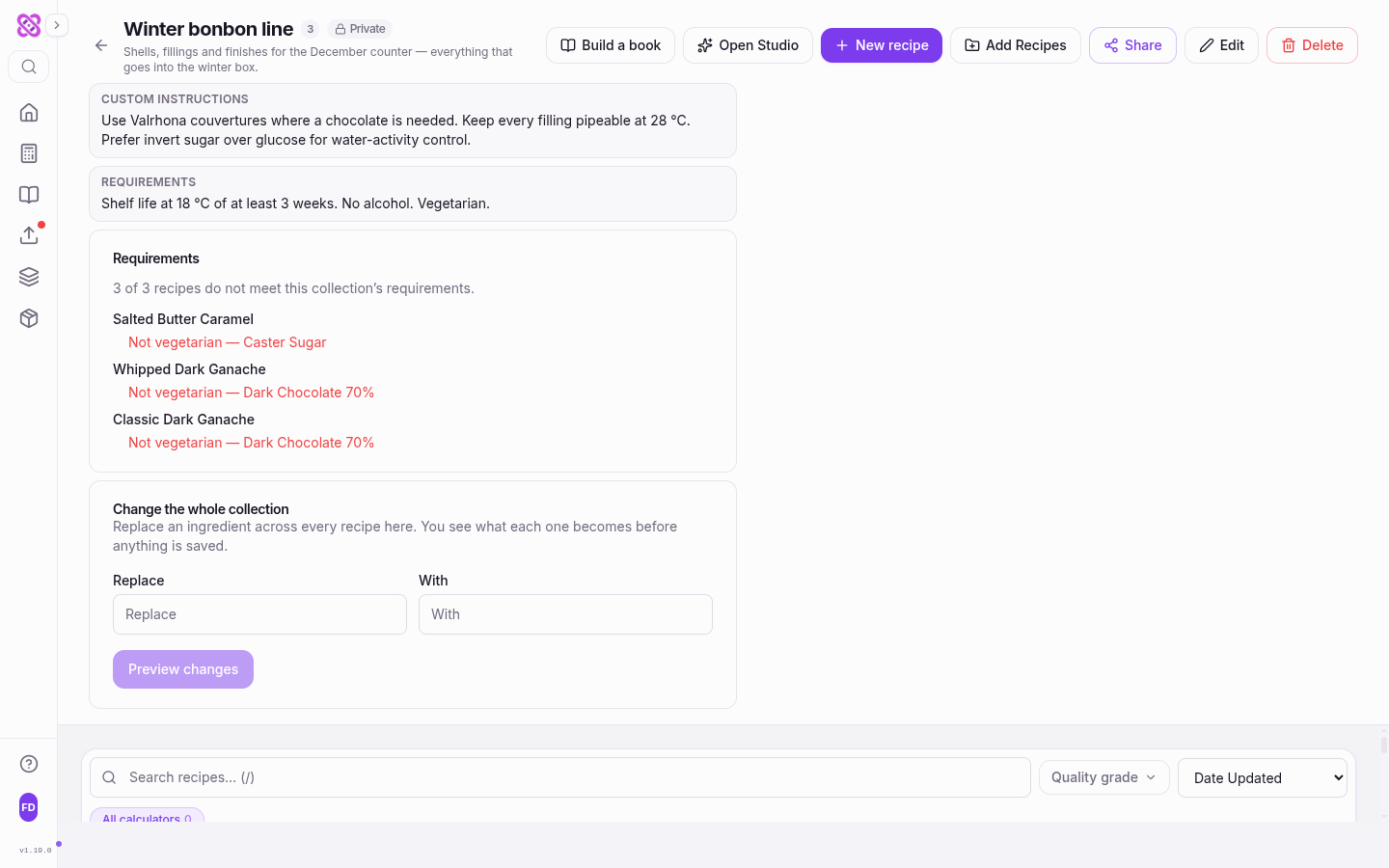
Three properties make that card worth trusting.
It reports and never blocks. A finding does not stop you saving a recipe, adding it to the collection, or shipping the line. The collection states what you want; you decide what to do about a recipe that misses it.
It asks no model. Every comparison runs against a value the calculation engine has already computed or the ingredient catalogue already records, which is why the verdict can be stated rather than suggested. A dietary requirement is met only when every ingredient carries that marking, and the finding names the one that broke it. Those markings are catalogue data, not certifications — treat a clean dietary check as a shortlist, not a declaration.
It refuses to guess. If a recipe’s saved results are out of date, its metric targets come back as unanswered rather than passed: reporting a stale number as conforming would be worse than saying nothing. Recalculate the recipe and the card answers properly.
Collection Studio: A Sentence to a Saved Recipe Set
A brief is also a good starting point for recipes that do not exist yet. Create with AI on the collections page, or Open Studio on a collection, opens the Recipe Collection Studio: Discuss, create, review, and save a complete recipe set without leaving Studio.
Describe the set
The Collection assistant pane takes plain language — “six bright summer bonbons with a two-week shelf life”. Its composer says what it will not do on its own: “Discuss freely. Creating recipe drafts always requires a separate explicit click.”
Get a plan, not recipes
Propose recipe set returns a structured plan: a name, a one-line brief and a chosen calculator for each idea. The project's own description, instructions, requirements and tags are sent along with it, so the plan answers the brief rather than a blank page.
Create the drafts
The create button names the count — Create 6 drafts — and builds each idea into a full formula with catalogue ingredients, calculator settings and process stages. Progress is shown per recipe, and a draft that could not be completed says why and offers Retry or Start manually.
Review on the board
The Recipe set board holds every draft as Pending, Included or Excluded. Open one, edit its ingredients and stages in the inspector, then Include or Exclude it. Nothing is in your library yet.
Save the project
Save project writes the included drafts as real recipes and creates or updates the collection in one atomic step. Until then the whole project is a draft you can discard without touching any existing collection or saved recipe.
The gap between proposed and saved is deliberate and it is where the work actually happens. A model that writes eighteen recipes straight into your library has not saved you an afternoon; it has given you eighteen recipes to audit under production pressure.
The Assistant on the Dashboard
The Formul.io Assistant sits on the dashboard rather than in a side panel, and it is scoped to your saved work: Ask about saved work, ingredients, recipe drafts, and portfolio insights. Its starting chips name what it is for — Find an ingredient, Draft a recipe, Review my recipes, Draft an ingredient, Plan a collection.
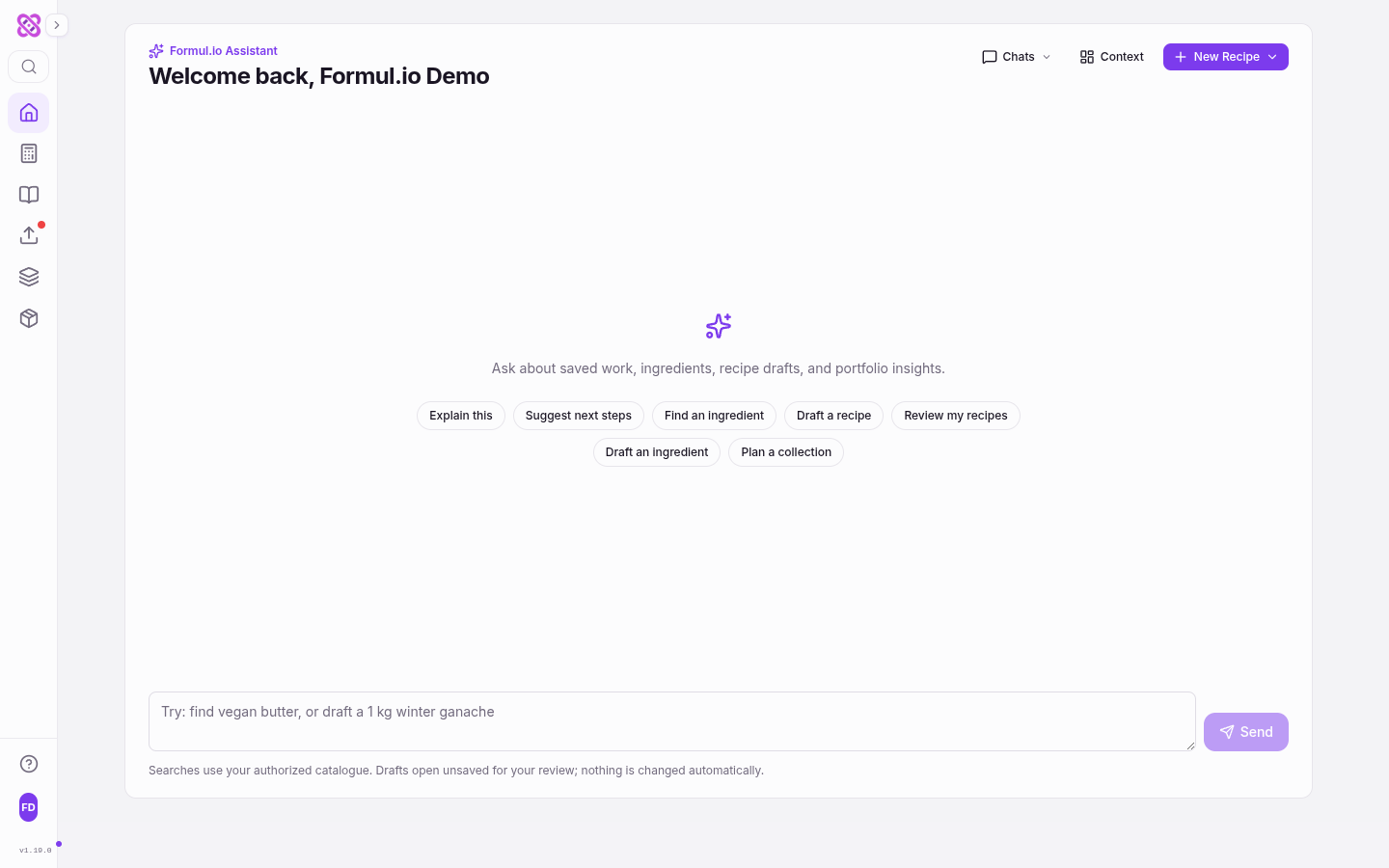
One of those chips leads straight back to collections. Plan a collection ends in a New recipe ideas card — a numbered list of proposals with the calculator picked for each — and a Create with AI link that carries the plan into Studio, where the drafts are built and reviewed.
Its neighbour Draft a recipe ends somewhere more useful than a message. The assistant proposes a formula, resolves each line against your ingredient catalogue and shows what matched, then offers Open in calculator. The draft opens in the real calculator with a banner naming it, computed metrics and all — and unsaved. The app is explicit about that: This opens an unsaved formula. Its original proposal survives refresh in this tab; edits in the calculator are saved only when you choose Save. Nothing enters your library until you press Save, and nothing the assistant does changes an existing recipe behind your back.
The Same Brief Through Claude or ChatGPT
The brief is not locked inside the app. Connect Formul.io to Claude or ChatGPT and the same project context is available to the assistant you already use.
get_collection returns a collection with its member recipes, and — for a collection you own, addressed by its id — its custom instructions and requirements, with the direction to honour them as project guidance while working inside it. Ask Claude for a new filling for the winter line and it starts from your couverture preference and your shelf-life target instead of asking you to restate them.
save_collection works the other way. It creates a collection or updates one, sets the name, description, tags, instructions and requirements, adds or removes member recipes, and can publish the collection. So the brief can be written, refined and reused from the chat window as easily as from the form.
What travels, and what stays in the app
The prose half of the brief travels: description, custom instructions and requirements. The checkable requirements — calculator, style, dietary switches and metric targets — are set in the app, and the conformance summary is read there. A public slug lookup returns only the public collection and its recipes: instructions and requirements are owner-only and are never exposed to a reader of a shared collection. Note also that save_collection overwrites the fields you pass and removes the member recipes you list, so it is worth asking the assistant what it intends to change before it writes.
Change the Whole Collection at Once
The last piece closes the loop the requirements opened. On the collection page, Change the whole collection does exactly what its note says: Replace an ingredient across every recipe here. You see what each one becomes before anything is saved.
Pick the ingredient to Replace and the one to swap it With, then press Preview changes. The collection comes back as a checklist: every member recipe with a tick you can clear, and any recipe the swap does not touch listed with not used in this recipe and no tick to give. Nothing is silently omitted — a recipe the operation skipped and a recipe it never reached would otherwise look identical from a shorter list. Then Apply to 8 recipes writes only the ones still ticked.
A substitution changes what is used, never how much or where: quantity, phase, stage and sort order stay as the recipe has them. No language model is consulted per recipe, so the same swap gives the same result every time. And because the preview and the apply derive the same proposal from the same operation, accepting a change cannot apply something other than what you saw.
Questions Confectioners Ask
What is the difference between Requirements and Checkable requirements?
Can a requirement stop me saving a recipe that does not meet it?
Who can see my custom instructions and requirements?
Does a collection brief change recipes on its own?
Why does a metric target say the recipe could not be judged?
Do I need Pro to use collections?
Related Articles

AI Recipe Development: From Idea to Production-Ready Formula
Turn a plain-language product brief into a validated formula — AI drafts the ingredients, the calculation engine verifies water activity, shelf life, and texture before you melt any chocolate.
Turn Claude or ChatGPT into Your Formulation Copilot
Your existing AI chat gets real recipe tools instead of copy-paste: search your library, save validated recipes, and simulate shelf-life impact — all connected with one link and an authorize click.

Lot Numbers and Traceability for Small Confectionery Producers
Set up lot numbers and one-step-back, one-step-forward traceability for a small confectionery kitchen: what counts as a lot, what each batch record needs, how to mark the pack under EU rules, and how to rehearse a recall.